


一、接线图
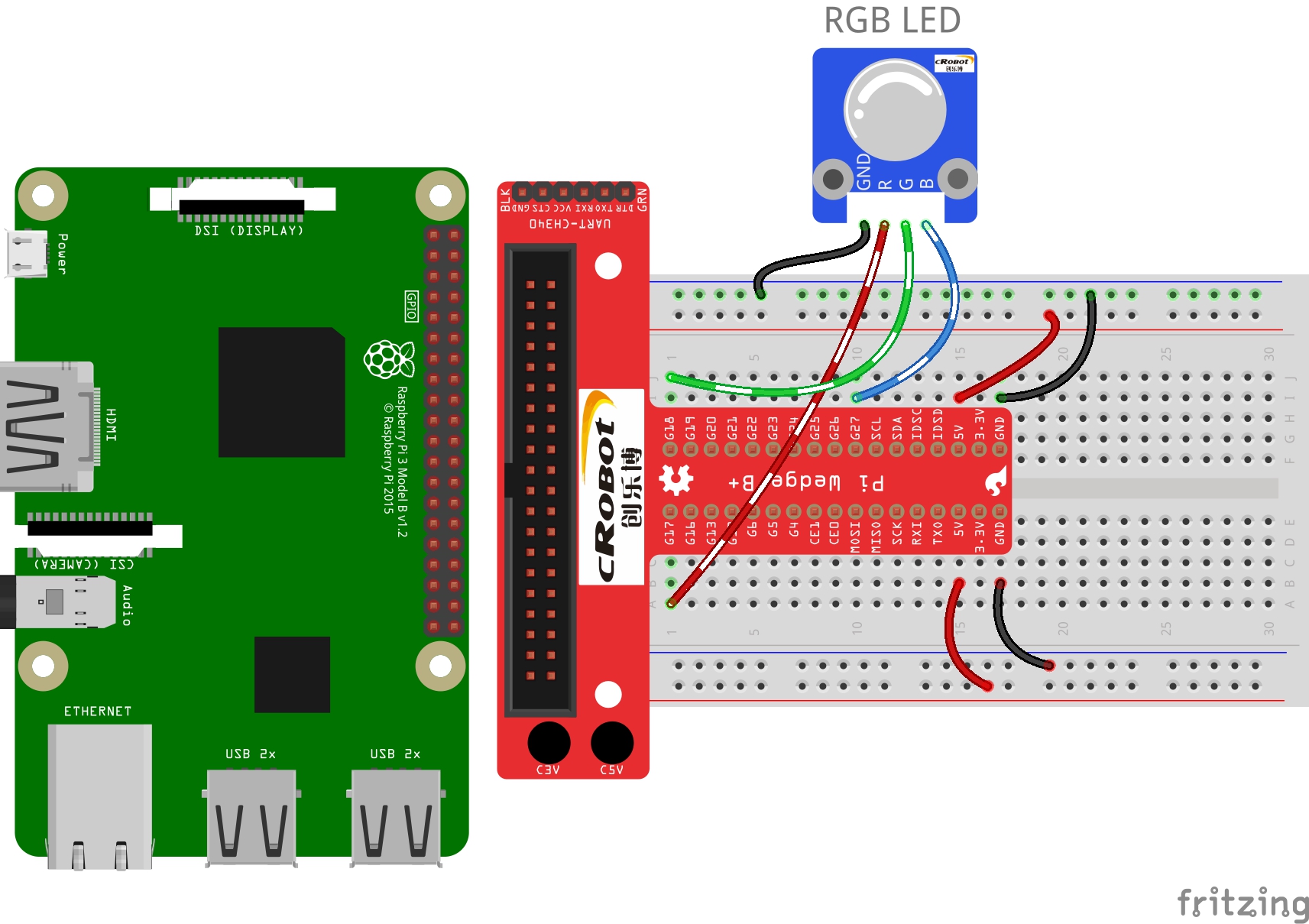
按照下图将RGB LED接到树莓派上。
二、C程序
#include <wiringPi.h>
#include <softPwm.h>
#include <stdio.h>

#define uchar unsigned char

#define LedPinRed    0
#define LedPinGreen  1
#define LedPinBlue   2

void ledInit(void)
{
	softPwmCreate(LedPinRed,  0, 100);
	softPwmCreate(LedPinGreen,0, 100);
	softPwmCreate(LedPinBlue, 0, 100);
}

void ledColorSet(uchar r_val, uchar g_val, uchar b_val)
{
	softPwmWrite(LedPinRed,   r_val);
	softPwmWrite(LedPinGreen, g_val);
	softPwmWrite(LedPinBlue,  b_val);
}

int main(void)
{
	int i;

	if(wiringPiSetup() == -1){ //when initialize wiring failed, print message to screen
		printf("setup wiringPi failed !");
		return 1;
	}
	//printf("linker LedPin : GPIO %d(wiringPi pin)
",LedPin); //when initialize wiring successfully,print message to screen

	ledInit();

	while(1){
		ledColorSet(0xff,0x00,0x00);   //red
		delay(500);
		ledColorSet(0x00,0xff,0x00);   //green
		delay(500);
		ledColorSet(0x00,0x00,0xff);   //blue
		delay(500);

		ledColorSet(0xff,0xff,0x00);   //yellow
		delay(500);
		ledColorSet(0xff,0x00,0xff);   //pick
		delay(500);
		ledColorSet(0xc0,0xff,0x3e);
		delay(500);

		ledColorSet(0x94,0x00,0xd3);
		delay(500);
		ledColorSet(0x76,0xee,0x00);
		delay(500);
		ledColorSet(0x00,0xc5,0xcd);
		delay(500);

	}

	return 0;
}
三、程序运行
gcc rgb_led.c -o rgb_led -lwiringPi -lpthread
./rgb_led
版权声明
1.本站大部分下载资源收集于网络,不保证其完整性以及安全性,请下载后自行测试。
2.本站资源仅供学习和交流使用,版权归资源原作者所有,请在下载后24小时之内自觉删除。
3.若作商业用途,请购买正版,由于未及时购买和付费发生的侵权行为,与本站无关。
4.若内容涉及侵权或违法信息,请联系本站管理员进行下架处理,邮箱ganice520@163.com(本站不支持其他投诉反馈渠道,谢谢合作)


发表评论